

Moving to Business Central: A Guide for First Time ERP Buyers
Moving to Business Central can help a growing business replace disconnected tools with one system. It matters because spreadsheets, basic accounting software, and manual processes can slow down finance, inventory, sales, and customer service.
Many companies buy their first ERP when daily work becomes too hard to manage. Orders increase. More staff need the same data. Inventory errors rise. Month end takes too long. Leaders need better reports.
Microsoft Dynamics 365 Business Central gives teams one place to manage core business work. It connects financials, purchasing, inventory, warehouse tasks, sales, projects, and more. Microsoft designed it for small and mid-sized businesses that need stronger control without enterprise level complexity.
What Is Moving to Business Central?
Moving to Business Central means replacing separate business tools with Microsoft’s cloud-based ERP system.
An ERP system is software that connects key parts of a business. It gives finance, operations, sales, and warehouse teams shared data. So, employees can work from the same numbers.
Business Central is Microsoft’s business management solution for small and mid-sized organizations. It helps companies manage finance, manufacturing, sales, shipping, service, projects, and inventory in one platform.
For a first time ERP buyer, Business Central can become the main system of record. Instead of searching through files and separate apps, users can view business data in one place.
Simple ERP example
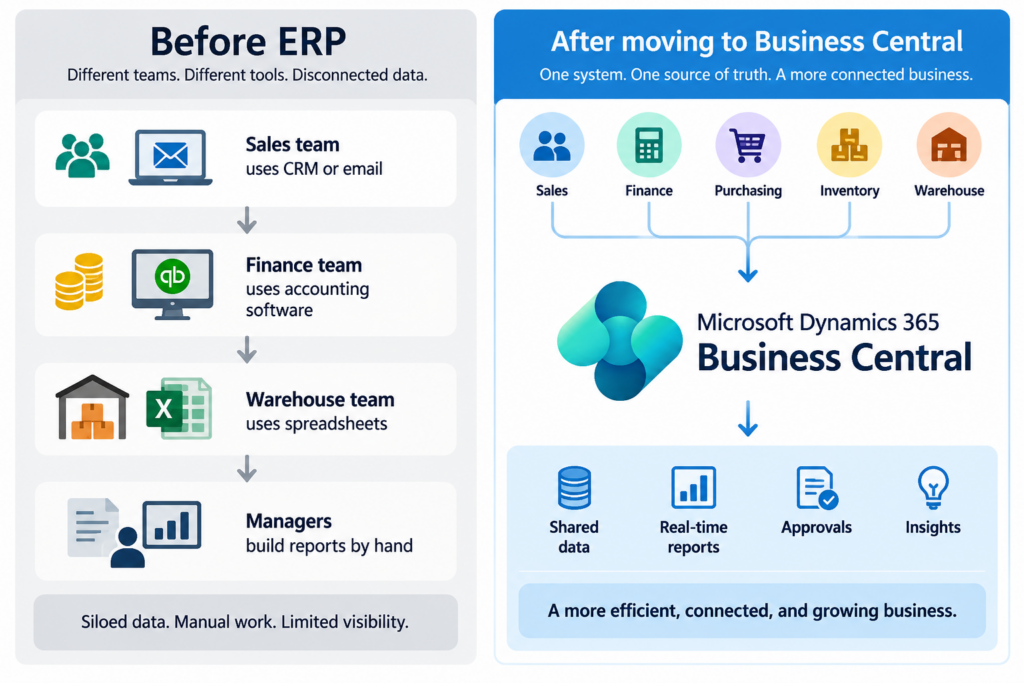
This shared setup can reduce duplicate data entry. It can also help leaders act faster.
Common Problems Businesses Face
First time ERP buyers often start with accounting software. That tool may work well at first. However, growth creates new needs.
A wholesale distributor may add more warehouses. A manufacturer may need better production costs. A retailer may need clear inventory data across stores, online orders, and stock locations.
Here are common issues that lead businesses to consider ERP.
-
Finance teams spend too much time closing the books.
-
Sales staff cannot see real time stock levels.
-
Buyers place orders without clear demand data.
-
Warehouse staff use paper, spreadsheets, or separate tools.
-
Inventory counts do not match the accounting system.
-
Leaders wait days or weeks for reports.
-
Staff enter the same information in multiple systems.
-
Teams lack a clear approval process for purchases and payments.
-
Growing companies cannot easily add users, locations, or processes.
-
IT teams spend too much time fixing data issues.
These problems create more than wasted time. They can affect cash flow, customer service, margins, and trust in company reports.
For example, a distributor may sell stock that is no longer available. Then the sales team must delay the order. The customer may lose confidence. At the same time, finance may not see the full margin impact until month end.
How Moving to Business Central Solves This
Moving to Business Central helps companies bring core processes into one connected system. Teams can use shared records for customers, vendors, items, orders, invoices, and financial activity.
Microsoft states that Business Central connects purchasing, inventory, warehousing, fulfillment, and financial management in one solution. It also supports supply chain visibility and inventory planning.
Finance and accounting
Business Central helps finance teams manage general ledger activity, accounts payable, accounts receivable, budgets, cash flow, and financial reporting.
Instead of waiting for files from different departments, finance teams can work from transactions recorded in the ERP system. This can make month end work more organized.
Sales and customer orders
Sales teams can create quotes, sales orders, invoices, returns, and customer records. They can also check item availability before making promises to customers.
This helps teams give more accurate delivery dates. It also reduces the risk of selling unavailable stock.
Purchasing and inventory
Purchasing teams can manage vendors, purchase orders, item costs, replenishment, and receiving. Inventory teams can track quantities by location, bin, or warehouse process.
Business Central supports common sales processes such as quotes, orders, returns, customer accounts, and drop shipments.
Warehousing and fulfillment
Warehouse teams can use Business Central to manage inventory movement, picks, shipments, receiving, and locations. The right setup depends on the company’s size, warehouse layout, and order volume.
A growing distributor may start with basic warehouse functions. Later, it can add more advanced warehouse processes as needs grow.
Manufacturing
Manufacturers can use Business Central to manage bills of materials, routings, production orders, capacity, and production costs. Microsoft lists support for assembly, manufacturing, and directed warehouse management for more complex business processes.
Manufacturing and service management features are included with the Premium license, while the Essentials license covers many cores finance, sales, purchasing, inventory, supply planning, project, and warehouse functions.
Key Benefits of Moving to Business Central
Moving to Business Central is not only a software change. It is a chance to improve how your business works.
-
One source of truth: Teams use the same customer, item, vendor, and financial data.
-
Better inventory control: Users can see stock, purchasing, demand, and fulfillment activity in one system.
-
Faster financial reporting: Finance teams can build reports from current business data.
-
Improved cash flow visibility: Leaders can review receivables, payables, sales activity, and inventory value.
-
Stronger order accuracy: Sales teams can check item availability before confirming orders.
-
More useful purchasing: Buyers can use demand, stock levels, and vendor information to plan orders.
-
Support for growth: Businesses can add users, locations, business processes, and connected apps over time.
-
Better controls: Approval workflows and shared records can help reduce manual errors.
-
Microsoft ecosystem fit: Business Central works within the Microsoft Dynamics 365 environment and can support connected Microsoft tools and business apps.
-
Flexible industry use: It supports common processes in wholesale distribution and can also support manufacturing, assembly, service, and warehouse operations.
Real World Scenario
Consider a U.S. wholesale distributor with 35 employees. The company sells industrial parts to contractors, repair shops, and retailers.
The business uses accounting software for finance. The warehouse uses spreadsheets. Sales reps call the warehouse to check stock. The owner reviews reports once each month.
The company faces several issues:
-
Orders ship late because stock numbers are wrong.
-
Buyers overorder some items and run out of others.
-
Finance spends many days reconciling inventory data.
-
Sales reps cannot quickly answer customer questions.
-
Leaders do not see clear margin data by item or customer.
After moving to Business Central, the company can manage sales orders, purchases, inventory, warehouse work, and financial activity in one ERP system.
A sales rep enters an order. The system shows available inventory. If stock is low, the buyer can review demand and purchasing needs. When the warehouse ships the order, the transaction updates the related business records. Finance can then see the impact sooner.
The result is not automatic success. The company still needs clean data, trained users, and clear processes. However, it now has a stronger foundation for growth.
Why This Matters for United States Businesses
Businesses across the United States face many of the same operating pressures. Labor costs rise. Customer expectations increase. Supply chains change. Buyers want faster answers. Leaders need better control of cash and inventory.
These needs apply in every state. A distributor in Florida may manage storm related demand. A manufacturer in Ohio may face production scheduling issues. A retailer in Texas may need better visibility across stores and online sales. The details differ, but the core need stays the same: teams need accurate data.
National business challenges
United States businesses often face these ERP challenges:
-
Multiple locations in different states
-
Different sales tax and reporting needs
-
Long supplier lead times
-
High freight and inventory costs
-
More customer demand for fast shipping
-
Labor shortages in finance, warehouse, and operations roles
-
Separate systems after acquisitions or rapid growth
-
Limited visibility into margins by product, customer, or location
Business Central gives companies a shared platform for financial and operational data. Therefore, leaders can improve consistency across locations while keeping local teams productive.
A qualified Business Central partner in the United States can help match the system to your industry, workflows, reporting needs, and growth plans. The right partner should focus on process design, data quality, training, and long term support.
FAQ: Moving to Business Central
Is Business Central good for first time ERP buyers?
Yes. Business Central fits many small and mid sized businesses that have outgrown basic accounting tools. It brings finance and operations into one system.learn.microsoft+1
What is Microsoft Dynamics 365 Business Central?
Microsoft Dynamics 365 Business Central is a business management ERP solution. It helps companies manage finance, sales, purchasing, inventory, warehouse work, projects, manufacturing, and more.
How long does it take to move to Business Central?
The timeline depends on company size, data quality, users, integrations, and process needs. A focused first phase can move faster than a large custom project.
Does Business Central work for wholesale distribution?
Yes. Business Central supports purchasing, inventory, warehousing, fulfillment, financial management, sales orders, customer accounts, and drop shipments.
Can manufacturers use Business Central?
Yes. Business Central supports manufacturing functions such as production orders, shop floor resources, capacity planning, production components, and production operations.
Does Business Central replace QuickBooks or other accounting software?
It can. Many growing businesses move from basic accounting software when they need connected inventory, purchasing, sales, warehouse, and reporting functions.
Do we need the Premium license for manufacturing?
Usually, yes. Microsoft’s Premium license includes manufacturing and service management features in addition to the Essentials capabilities.
Can Business Central support multiple locations?
Yes. The system can support businesses that manage inventory, users, customers, and operations across multiple locations. The best design depends on your warehouse, entity, and reporting needs.
What should we do before selecting an ERP?
Document your current processes, pain points, reports, integrations, users, and growth goals. Then prioritize what must work at launch and what can wait for a later phase.
How Navisiontech Can Help
Navisiontech can help first time ERP buyers make a clear, practical plan for moving to Business Central.
Our approach should begin with your business process, not just software features. We help you identify where manual work, disconnected data, and reporting gaps create risk.
Navisiontech can support your Business Central journey through:
-
ERP readiness assessments
-
Business process discovery
-
Finance, inventory, purchasing, sales, and warehouse planning
-
Manufacturing and distribution process reviews
-
Data migration planning and cleanup
-
QuickBooks, legacy ERP, and spreadsheet replacement planning
-
Business Central implementation support
-
Custom integrations and add ons
-
User training and change management
-
Reporting, Power BI, and automation support
-
Ongoing Business Central support and optimization
Book a Free ERP Assessment
Moving to Business Central should start with a clear business case. You need to know what is broken today, what must improve first, and what your team needs to succeed.
Book a free ERP assessment with Navisiontech. We will review your current tools, business processes, reporting needs, data risks, and growth plans. Then we can help you build a practical roadmap for Microsoft Dynamics 365 Business Central.




Leave A Comment