

When to Upgrade from QuickBooks to Manufacturing ERP Software
QuickBooks works well for many small businesses. However, it can become hard to manage as manufacturing grows. You may need better inventory control, job costing, planning, and reporting. This guide explains when to upgrade from QuickBooks to manufacturing ERP software and how Microsoft Dynamics 365 Business Central can help.
For manufacturers, wholesalers, and retailers, the right system improves daily work. It also gives leaders better facts before they make big choices.
Quick answer: You should consider manufacturing ERP software when QuickBooks no longer gives you clear, current data on inventory, production costs, orders, and cash flow.
What Is Manufacturing ERP Software?
Manufacturing ERP software is one system that manages core business work. ERP means Enterprise Resource Planning.
It brings key areas into one place. These areas can include:
-
Finance and accounting
-
Inventory control
-
Purchasing
-
Sales orders
-
Production planning
-
Bills of materials
-
Job costing
-
Warehousing
-
Shipping
-
Customer service
-
Business reports
QuickBooks is mainly an accounting system. It tracks income, bills, payments, and basic inventory. Manufacturing ERP software goes further because it links finance with purchasing, stock, production, and sales.
This matters because manufacturing teams need more than general ledger reports. They need to know what materials they have, what products they can build, and what each order truly costs.
QuickBooks vs. Manufacturing ERP
Common Problems Businesses Face
A growing manufacturer may not notice system limits right away. However, the problems grow over time.
Many teams start adding spreadsheets, third-party apps, and manual steps. These tools may help at first. However, they can create more work later.
Here are common warning signs.
Inventory Counts Do Not Match Reality
Your QuickBooks inventory count may not match the warehouse count. This can happen when teams use paper, spreadsheets, or separate warehouse tools.
As a result, buyers may order parts you already have. Sales teams may also promise products that are not ready.
Teams Rely on Too Many Spreadsheets
Spreadsheets often fill gaps in QuickBooks. Teams may track production, purchase orders, stock, and job costs in separate files.
This creates risk because each file may show different numbers. Also, one missed update can lead to bad decisions.
Production Costs Are Hard to See
Manufacturers need to track more than material costs. They also need labor, machine time, freight, scrap, and overhead.
QuickBooks can track some costs. However, it may not show the full cost of a finished item. Therefore, managers may set prices without knowing the true profit.
Planning Takes Too Long
A planner may need hours to answer simple questions:
-
Do we have enough raw material?
-
What should we buy this week?
-
Can we finish this order on time?
-
Which jobs need attention?
-
What product has the best margin?
When answers require several spreadsheets, teams react too late.
Sales Growth Creates More Errors
More orders should create more profit. However, poor processes can turn growth into stress.
As order volume rises, manual entry often rises too. Staff may enter the same data into QuickBooks, spreadsheets, shipping tools, and customer portals.
This can cause wrong orders, late shipments, and slow invoicing.
Multiple Locations Create Blind Spots
Many distributors and manufacturers add warehouses, plants, stores, or remote teams. QuickBooks may become harder to manage across those locations.
Leaders need one view of stock, sales, costs, and cash. Without it, each location may work from a different version of the truth.
When to Upgrade from QuickBooks to Manufacturing ERP Software
You should consider an upgrade when manual work harms speed, control, or profit.
The best time is usually before a major business change. For example, you may plan to add a warehouse, open a new plant, launch a product line, or enter new states.
Use this simple check.
ERP Upgrade Flow
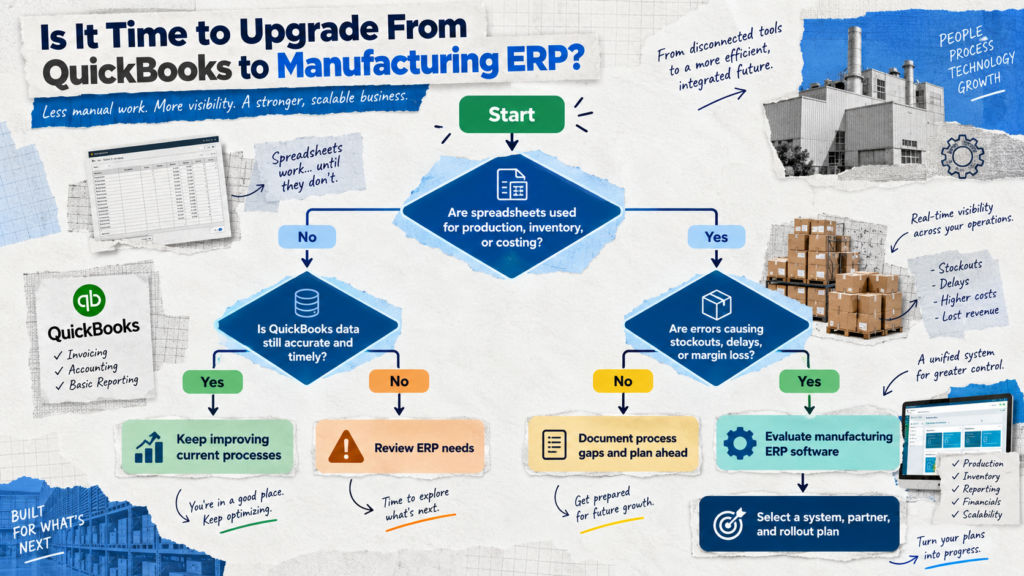
You may be ready for manufacturing ERP software if three or more of these statements are true:
-
Your team manages inventory in spreadsheets.
-
You cannot see actual job costs quickly.
-
Inventory adjustments happen often.
-
Month-end close takes too long.
-
You have several warehouses or business units.
-
Production schedules change every day.
-
Buyers cannot see true demand.
-
Sales teams cannot promise accurate delivery dates.
-
Your staff enters the same data more than once.
-
You depend on many add-ons to run daily work.
-
Leadership does not trust current reports.
-
You need better lot, serial, or traceability controls.
The goal is not to replace QuickBooks because it is bad. The goal is to use a system that fits your next stage of growth.
How Microsoft Dynamics 365 Business Central Solves This
Microsoft Dynamics 365 Business Central is a cloud ERP system for small and mid-sized businesses. It connects financials, sales, purchasing, inventory, warehousing, projects, and operations in one platform. Microsoft positions Business Central as a solution that helps businesses manage finance, supply chain, sales, and service from one connected system.searchengineland
For manufacturers, Business Central can provide better control over items, components, production orders, and costs. It helps teams work from shared data instead of separate files.
Business Central Supports Daily Manufacturing Work
Business Central can help your business:
-
Track raw materials, work in process, and finished goods.
-
Create and manage bills of materials.
-
Plan production based on demand and supply.
-
Create purchase orders from item needs.
-
Track item costs and margins.
-
Manage vendors, customers, and sales orders.
-
Use locations, bins, and warehouse processes.
-
Review financial data and operational data together.
-
Connect with Microsoft tools such as Excel, Outlook, Teams, and Power BI.
-
Support multiple companies, locations, and currencies.
For example, a production manager can check available parts before releasing a work order. At the same time, finance can review expected costs. Sales can then give customers a more accurate ship date.
That shared view helps teams make faster choices.
Better Data From One System
A connected ERP system reduces the need to move data by hand. It also makes reporting easier.
Instead of asking, “Which spreadsheet is correct?” leaders can ask, “What action should we take?”
That change is important. It gives CFOs, COOs, IT Directors, ERP Managers, and owners more time to improve the business.
Key Benefits of Upgrading From QuickBooks
An ERP upgrade should solve clear business problems. It should not add complexity without a reason.
Key benefits include:
-
Better inventory control: Track materials and finished goods across locations.
-
Clearer job costs: See material, labor, and overhead costs in one place.
-
Faster planning: Match demand, supply, and production needs.
-
More accurate orders: Reduce manual entry and improve order data.
-
Stronger purchasing: Help buyers order the right items at the right time.
-
Improved cash control: Connect inventory, payables, receivables, and financial reports.
-
Faster reporting: Give leaders current reports without building every report in Excel.
-
More traceability: Track lots and serial numbers when needed.
-
Room to grow: Support more users, locations, products, and business units.
-
Lower process risk: Reduce errors from duplicate entry and disconnected files.
Business Central also supports a more structured data model. This gives companies a stronger base for Power BI reporting, automation, EDI, ecommerce, warehouse tools, and industry add-ons.
Real World Example
Consider a growing parts manufacturer in the United States.
The company sells custom assemblies to wholesalers and direct customers. It uses QuickBooks for accounting. It also uses separate spreadsheets for inventory, job costs, production plans, and purchasing.
At first, the process works. Then the company adds new product lines and a second warehouse.
Soon, the team faces problems:
-
Sales cannot confirm ship dates quickly.
-
Buyers order materials based on old spreadsheet data.
-
The warehouse finds stock that QuickBooks does not show.
-
Managers do not know which jobs earn the best margin.
-
Month-end reporting takes several days of manual work.
The company moves to Microsoft Dynamics 365 Business Central with a manufacturing-focused setup.
Now, the team can:
-
Create sales orders in the ERP.
-
Check current inventory and open supply orders.
-
Build or update production orders.
-
Plan material needs.
-
Purchase missing components.
-
track actual costs against expected costs.
-
Review sales, inventory, and margin reports from one system.
The company does not remove every process problem overnight. However, it creates a reliable base for growth. It also reduces the guesswork that came from disconnected data.
Why This Matters for United States Businesses
Manufacturers, distributors, and retailers across the United States face similar pressures. Labor costs rise. Supply chains change. Customers expect fast answers. Also, leaders need better control over cash and inventory.
National businesses often face added complexity because they serve customers in many states. They may manage several warehouses, different tax needs, regional shipping rules, and separate sales teams.
National Business Challenges
A business may need one system that supports operations from Florida to California. It may also need clear data across plants, branches, stores, and warehouses.
Common national challenges include:
-
Managing inventory in several states.
-
Moving products between locations.
-
Supporting remote users and mobile teams.
-
Handling different sales tax needs.
-
Tracking freight and delivery costs.
-
Managing large vendor networks.
-
Selling through direct, dealer, retail, and online channels.
-
Closing the books across more than one entity.
-
Keeping leaders informed with current data.
Business Central can support a centralized ERP approach while giving each team access to the data it needs. A qualified Business Central partner in the United States can help configure the system for your industry, locations, workflows, and growth plans.
The right partner should also understand manufacturing, wholesale distribution, retail operations, data migration, integrations, user training, and long-term support.
FAQ
When should a manufacturer move from QuickBooks to ERP software?
Consider moving when QuickBooks no longer supports inventory, production, costing, or reporting needs. Repeated spreadsheet work and data errors are strong signs.
Can QuickBooks manage manufacturing?
QuickBooks can support basic accounting and simple inventory. However, many manufacturers need deeper tools for bills of materials, production orders, material planning, and actual job costs.
Is Microsoft Dynamics 365 Business Central good for manufacturing?
Business Central can support many small and mid-sized manufacturers. It connects finance, inventory, purchasing, production, warehousing, and reporting in one ERP platform.
How long does a QuickBooks to Business Central project take?
The timeline depends on data quality, process needs, integrations, and user count. A focused rollout may take weeks, while a larger multi-location project may take several months.
What data should move from QuickBooks to an ERP?
Most businesses move customers, vendors, chart of accounts, open invoices, open bills, inventory, and opening balances. You may also move item history, sales history, and other records based on reporting needs.
Will we still be able to use Excel?
Yes. Many teams continue using Excel for analysis. Business Central can work with Microsoft tools, so users can analyze ERP data without relying on uncontrolled spreadsheets.
Does an ERP replace every spreadsheet?
Not always. Spreadsheets still help with quick analysis. However, core data such as inventory, orders, costs, and financials should live in the ERP.
How Navisiontech Can Help
Navisiontech can help you decide whether Business Central is the right next step after QuickBooks. The first goal should be clarity, not a rushed software decision.
A structured review can help your team:
-
Map current QuickBooks and spreadsheet processes.
-
Find inventory, costing, and reporting gaps.
-
Define manufacturing and warehouse needs.
-
Review integration needs for ecommerce, EDI, CRM, shipping, or payroll.
-
Plan QuickBooks data migration.
-
Identify the right Business Central modules and add-ons.
-
Create a phased ERP rollout plan.
-
Train users for finance, purchasing, sales, inventory, and operations.
-
Build reports and dashboards for leaders.
Book a Free ERP Assessment
QuickBooks may still fit your business today. However, if spreadsheets, stock errors, slow reporting, and unclear costs block growth, it may be time to review your options.
A free ERP assessment can help your team identify process gaps, define priorities, and build a practical upgrade plan. You do not need to decide on software before the assessment.
Book a free ERP assessment with Navisiontech to find out whether Business Central can support your next stage of growth.



Leave A Comment