

Business Central First Time Buyer Guide: A Blueprint for Success
Buying your first ERP system is a big step. Your business may use spreadsheets, basic accounting tools, and separate apps. These tools can work for a while. However, they can create problems as your business grows.
Orders may not match inventory. Finance may wait for reports. Staff may enter the same data more than once. Leaders may not know the real cash or profit picture.
This Business Central first time buyer guide explains how to plan for success. It helps CFOs, COOs, IT leaders, ERP managers, and business owners choose the right path.
Microsoft Dynamics 365 Business Central can connect finance, sales, inventory, purchasing, warehouse work, and operations. However, software alone does not fix poor processes. Your team needs a clear plan first.
A good starting point is an ERP assessment. It helps you review your current tools, business goals, risks, data, and process gaps before you invest.
Quick answer: Microsoft Dynamics 365 Business Central is cloud ERP software. It helps businesses manage finance, inventory, sales, purchasing, and operations in one connected system.
What Is a Business Central First Time Buyer Guide?
A Business Central first-time buyer guide is a practical plan for selecting and launching Microsoft Dynamics 365 Business Central.
It helps your business answer key questions before the project begins:
-
What business problems must we solve?
-
Which processes need to improve?
-
Which teams need to use the system?
-
What data must move into the new ERP?
-
Which reports do leaders need?
-
Which systems need to connect with Business Central?
-
Which work must happen in phase one?
-
Which needs can wait until later?
Microsoft Dynamics 365 Business Central is a business management system for small and mid sized organizations. It can support finance, sales, purchasing, inventory, warehousing, manufacturing, projects, and reporting.
Microsoft also describes Business Central as a connected platform for finance, sales, service, and operations. It works with Microsoft tools such as Outlook, Excel, Teams, and Power BI. Microsoft Dynamics 365 Business Central can help teams use shared data instead of separate files and systems.
Business Central can support:
-
General ledger and financial reporting
-
Accounts payable and accounts receivable
-
Customer sales orders
-
Vendor purchasing
-
Inventory planning
-
Warehouse and location tracking
-
Item lot and serial number tracking
-
Manufacturing orders and bills of materials
-
Budgeting and cash flow planning
-
Project accounting
-
Power BI dashboards
-
Microsoft 365 connections
A planned Business Central implementation helps turn these tools into simple daily workflows.
Common Problems Businesses Face Before Buying Business Central
Many companies do not plan to use too many systems. It happens over time.
A business adds accounting software first. Then it adds spreadsheets. Later, it adds ecommerce tools, warehouse software, shipping apps, CRM systems, and reporting tools.
Each tool may solve one problem. However, separate tools can create new problems.
Too Many Spreadsheets
Spreadsheets can help small teams. However, they become hard to manage as sales, inventory, and users grow.
One person may update a sales file. Another person may update an inventory file. Finance may use a third file. The numbers may not match.
This creates risk because leaders may make decisions from old data.
A growing company may need to replace QuickBooks with Business Central when accounting, inventory, and reporting become too complex.
Poor Inventory Visibility
Wholesale distributors, manufacturers, and retailers need accurate inventory data. They need to know what is in stock, what is on order, and what is already promised to customers.
Without good inventory visibility, teams may face:
-
Stockouts
-
Excess inventory
-
Rush purchase orders
-
Higher carrying costs
-
Late customer shipments
-
Lost sales
-
Poor warehouse control
Inventory problems also hurt cash flow. Too much inventory ties up cash. Too little inventory can hurt customer service.
Slow Financial Close
Finance teams often gather data from many places. They may use accounting software, spreadsheets, warehouse systems, and sales reports.
This slows month end close. It can also make reporting less accurate.
CFOs need current data for decisions. They need to see revenue, margin, inventory value, unpaid invoices, and cash needs.
A Power BI reporting solution for Business Central can help leaders view key numbers faster.
Disconnected Systems
Your business may use one tool for accounting and another for inventory. You may also use separate tools for ecommerce, shipping, CRM, EDI, payroll, and customer service.
These systems may not share data well. So, staff may enter the same information more than once.
Manual entry takes time. It also creates errors.
ERP integration services can help connect Business Central with the systems your business still needs.
For example, a distributor may need Business Central EDI integration. A retailer may need Business Central ecommerce integration. A company with complex shipping may need a shipping or carrier connection.
Limited Reporting
Business owners need fast answers. They need to know what is selling, what is profitable, and where cash is going.
However, old systems may not provide that data in one place. Teams then build reports by hand.
This often leads to more questions:
-
Which product lines have the best margin?
-
Which locations have slow inventory?
-
Which customers pay late?
-
Which vendors cause delays?
-
Which departments spend the most?
-
Which sales channels are growing?
Business Central can help create shared financial and operational data. Then Power BI reporting for Business Central can make that data easier to review.
Growth Makes Old Systems Harder
Basic tools may work when a business has one location and a small product list. However, growth adds more customers, orders, warehouses, employees, vendors, and sales channels.
The business may need better control.
This is where a Business Central readiness assessment can help. It shows what your business needs now and what it may need later.
How Business Central Solves First Time Buyer Problems
The Business Central first-time buyer guide should focus on business outcomes. It should not focus only on software features.
Microsoft Dynamics 365 Business Central brings key business data into one system. This can help finance, operations, sales, purchasing, and warehouse teams work from the same information.
Microsoft describes Business Central as a platform that connects finance, sales, service, and operations. It also supports work across inventory, supply chain, manufacturing, projects, and reporting. Microsoft Dynamics 365 Business Central
Business Central Connects Finance and Operations
A sales order affects many parts of a business. It can affect inventory, revenue, customer balances, shipping work, and future purchasing.
A purchase order can affect expected inventory, vendor balances, cash needs, and demand planning.
Business Central connects these business areas. So, teams do not need to move data between many tools.
This can help reduce double entry. It can also help teams find data faster.
Business Central Improves Inventory Control
Business Central can help your business track:
-
Items and item variants
-
Inventory by location
-
Warehouse bins
-
Lot numbers
-
Serial numbers
-
Reorder points
-
Safety stock
-
Open purchase orders
-
Open sales orders
-
Inventory movement
-
Expected inventory receipts
For more advanced needs, review Business Central warehouse management solutions. This can be useful for wholesale distribution, retail fulfillment, and multi warehouse operations.
A distributor can use Business Central to review what is available, what is committed, and what is due from vendors. This helps buyers make better purchasing decisions.
Business Central Supports Better Financial Visibility
Business Central supports core accounting work. Finance teams can manage general ledger, accounts payable, accounts receivable, fixed assets, budgets, and bank activity.
The system also supports dimensions.
Dimensions are simple tags used for financial reporting. Your business can use dimensions for locations, departments, product groups, business units, sales channels, or cost centers.
For example, a company can compare margin by warehouse, customer group, or product line.
This helps leaders ask better questions:
-
Which location makes the most profit?
-
Which product line has weak margin?
-
Where is cash tied up?
-
Which customers pay late?
-
Which department has high costs?
Business Central Works with Microsoft Tools
Many employees already use Outlook, Excel, Teams, and Power BI. Business Central can work with these Microsoft tools.
This can help lower user resistance. It can also help users work in familiar tools.
For example, a finance user can review data in Excel. A manager can view a dashboard in Power BI. A sales user can access customer information while working in Outlook.
Business Central Can Grow with Your Business
Your first ERP project should solve urgent problems. It should also support future growth.
Business Central can support added users, locations, companies, reports, workflows, integrations, and industry specific add ons.
This gives businesses room to grow without replacing their ERP again too soon.
A phased Business Central implementation roadmap can help your business start with the most important needs first.
Key Benefits of Business Central for First Time Buyers
Business Central can help businesses move from disconnected tools to a more connected way of working.
Key benefits include:
-
One system for finance, sales, purchasing, inventory, and operations
-
Better visibility into cash, margins, and open orders
-
Faster financial and operational reporting
-
Fewer manual entries between systems
-
Better inventory control and replenishment planning
-
Better controls for approvals and user access
-
Cloud access for users in different locations
-
Integration with Outlook, Excel, Teams, and Power BI
-
Support for multi company and multi-location needs
-
Ability to add industry tools as the business grows
-
Better data for forecasting and buying decisions
-
Clearer records for audits and internal control
However, Business Central is not a quick fix. Your results depend on process design, data cleanup, user training, and long-term support.
That is why many companies begin with an ERP process review before selecting their final project scope.
A Simple Business Central Buying Flow
Use this buying flow before you select licenses, add ons, or an implementation partner.
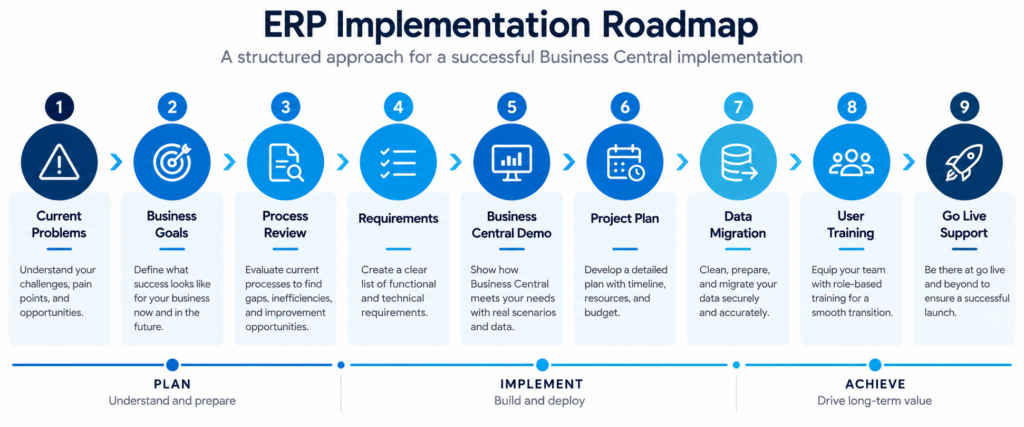
Step 1: Define Your Business Goals
Start with the result you need. Do not start with a long software feature list.
Good goals are clear and measurable.
Examples include:
-
Reduce month end close from 12 days to 7 days
-
Improve inventory accuracy
-
Stop double entry between ecommerce and accounting
-
Track profit by product line
-
Improve order fulfillment speed
-
Support a new warehouse
-
Improve cash flow reporting
-
Replace manual order processes
Clear goals help your ERP partner build a better project plan.
Step 2: Review Your Core Processes
Document how work happens today.
Review:
-
Finance and accounting
-
Customer sales orders
-
Purchasing
-
Vendor receiving
-
Inventory movement
-
Warehouse work
-
Shipping
-
Manufacturing
-
Ecommerce orders
-
Customer service
-
Reporting
Ask each team these questions:
-
What takes too long?
-
Where do errors happen?
-
What work needs double entry?
-
What report do you build by hand?
-
Which task depends on one person?
-
What data is hard to find?
-
What causes customer delays?
This process review often shows the true ERP need.
Step 3: Separate Needs from Wishes
Every ERP project has limits. Your budget, timeline, staff time, and scope matter.
Create three groups:
| Priority | Meaning | Example |
|---|---|---|
| Must have | Needed for go live | Finance, sales orders, inventory |
| Should have | Important after launch | Advanced Power BI dashboard |
| Nice to have | Helpful later | Special mobile approval process |
This helps control scope. It also prevents the project from becoming too large too soon.
Step 4: Plan Your Data Migration
Data migration is more than moving records. Your team needs to decide what data is useful, accurate, and needed for go live.
You may need to review:
-
Customers
-
Vendors
-
Items
-
Item costs
-
Pricing
-
Open sales orders
-
Open purchase orders
-
General ledger balances
-
Inventory quantities
-
Bank data
-
Fixed assets
-
Historical transactions
Before migration, clean the data. Remove duplicate records. Review inactive items. Confirm item units of measure. Check customer addresses. Validate opening balances.
ERP data migration services can help your business create a safer migration plan.
Step 5: Train Users Before Go Live
ERP users need time to learn new steps. Training should focus on real job tasks.
For example:
-
Finance users need to enter invoices and run reports.
-
Buyers need to create purchase orders.
-
Warehouse users need to receive and ship goods.
-
Sales users need to create quotes and orders.
-
Managers need to review dashboards and approvals.
Business Central user training can help employees feel ready before going live.
Do not train users only once. Give them practice time, simple guides, and support after launch.
Real World Business Central Scenario
Imagine a wholesale distributor with three warehouses in the United States.
The business sells 8,000 items. It uses accounting software, spreadsheets, a separate warehouse tool, and an ecommerce platform.
The finance team needs 12 business days to close each month. Buyers use spreadsheets to plan orders. Sales staff call the warehouse to check stock. Managers wait for margin reports.
The company decides to use Business Central as its first full ERP system.
Before Business Central
-
Sales staff cannot see current stock quickly
-
Buyers use manual spreadsheets for purchasing
-
Finance exports data from several systems
-
Managers wait days for key reports
-
Users enter sales and inventory data more than once
-
Inventory reports do not match actual stock
-
Ecommerce orders need manual review
-
Warehouse staff use separate records
After a Planned Business Central Launch
The business starts with finance, purchasing, sales orders, inventory, and basic reporting.
It then adds Business Central warehouse management for improved warehouse control. Later, it adds Business Central ecommerce integration to connect online orders with inventory and fulfillment.
Sales staff can check stock faster. Buyers can review demand and open orders. Finance can close using shared data. Managers can review more current reports.
The company does not solve every issue on day one. However, it creates a stronger base for growth.
The lesson is simple. ERP success comes from planning, clean data, trained users, and steady improvement after going live.
Why Business Central Matters for United States Businesses
Companies across the United States face pressure to move faster. Customers expect accurate orders, fast shipping, and clear answers.
At the same time, finance teams need better controls. Operations teams need accurate inventory. IT teams need secure, connected systems.
A business may sell in Florida, ship from Texas, buy from California suppliers, and serve customers in New York. This creates more moving parts.
Business Central can help connect data across locations, companies, users, and business functions.
National Business Challenges
Wholesale distribution, manufacturing, and retail businesses across the United States often face:
-
Rising labor costs
-
Supply chain delays
-
Higher freight costs
-
Inventory carrying costs
-
Demand changes by region
-
Multi location operations
-
Sales tax needs across states
-
Ecommerce order growth
-
Customer demand for faster delivery
-
Higher reporting and security needs
-
Expansion through acquisitions or new locations
These challenges make disconnected systems more costly.
A connected ERP helps teams respond with better information. However, your Business Central plan must fit your business model, industry, and growth goals.
That is why working with a Business Central partner in the United States matters. A national partner can help your team plan for integrations, reporting, data migration, training, and long-term support.
Navisiontech can support wholesale distribution ERP needs, manufacturing ERP needs, and retail ERP needs across the United States.
FAQ: Business Central First Time Buyers
Is Business Central good for a first time ERP buyer?
Yes. Business Central can work well for first time ERP buyers because it connects finance, inventory, sales, purchasing, and operations in one system. A focused project plan helps reduce risk.
How long does a Business Central implementation take?
The timeline depends on scope, data quality, integrations, and training needs. A focused first phase may take a few months, while larger projects can take longer.
Does Business Central work for wholesale distribution?
Yes. Business Central supports sales orders, purchasing, inventory, warehouse locations, vendor management, and financial reporting. Distributors may also add barcode, EDI, shipping, or warehouse tools.
Can manufacturers use Business Central?
Yes. Business Central includes tools for bills of materials, production orders, capacity planning, material planning, and costing. Some manufacturers also need industry specific add ons.
Does Business Central replace QuickBooks?
Business Central can replace QuickBooks when a business needs stronger inventory, purchasing, reporting, workflow, and operational control. It is often a good next step for growing companies.
Can Business Central connect with ecommerce platforms?
Yes. Business Central can connect with ecommerce platforms through connectors, APIs, or add ons. The best option depends on your ecommerce platform, order volume, and fulfillment process.
Is Business Central only for large companies?
No. Business Central supports small and mid-sized businesses. It can also support larger companies with multiple locations, companies, warehouses, and business processes.
What should we prepare before a Business Central demo?
Prepare your top problems, current systems, key reports, user roles, item counts, order volume, integrations, and growth plans. Also identify the work that creates the most delays or errors.
How Navisiontech Can Help
Navisiontech helps businesses plan Business Central projects with clear goals and realistic steps.
The first step is often an ERP assessment. This review can help your team understand your current processes, systems, data, reporting needs, and integration requirements.
Navisiontech can help with:
-
Business Central implementation planning
-
Business Central consulting services
-
ERP requirements and process review
-
ERP data cleanup and migration
-
QuickBooks to Business Central migration planning
-
Dynamics NAV to Business Central upgrade planning
-
Business Central warehouse management
-
Business Central manufacturing solutions
-
Business Central ecommerce integration
-
Business Central EDI integration
-
Power BI reporting for Business Central
-
Business Central user training
-
Business Central support services
A successful ERP project should begin with facts. It should not begin with a rushed demo or a vague promise.
Navisiontech can help your team define the right scope. We can help you review risks, set priorities, plan integrations, clean data, and prepare users for change.
Book a Free ERP Assessment
Your business may be ready for Business Central if spreadsheets, disconnected tools, or basic accounting software now slow your growth.
Start with a clear plan.
Book a free ERP assessment with Navisiontech. We will review your current systems, business goals, process gaps, reporting needs, integrations, and Business Central fit.
You will leave with clearer next steps and better questions for your ERP project.
Ready to build your Business Central plan? Book Your Free ERP Assessment




Leave A Comment