
Sage to Dynamics 365 Business Central Migration: A Pipeline-Driven Approach with Azure Data Factory
Moving from Sage to Microsoft Dynamics 365 Business Central is not simply a matter of exporting spreadsheets and importing them into a new ERP. A successful migration must preserve the business meaning behind master data, financial structures, inventory relationships, bills of materials, and historical records.
Navisiontech has designed an Azure Data Factory based Sage to Business Central migration connector to make this process more structured, repeatable, and scalable. The connector uses configurable data pipelines to extract Sage data, transform it to match Business Central requirements, validate it, and load it into the appropriate Business Central entities.
The result is a migration approach that can support both foundational data conversion and more complex scenarios involving dependencies, data quality rules, historical data, and phased cutovers.
Quick answer: Navisiontech helps organizations migrate Sage data to Dynamics 365 Business Central through Azure Data Factory pipelines that can move and transform items, vendors, the chart of accounts, bills of materials, history, and other business-critical records.
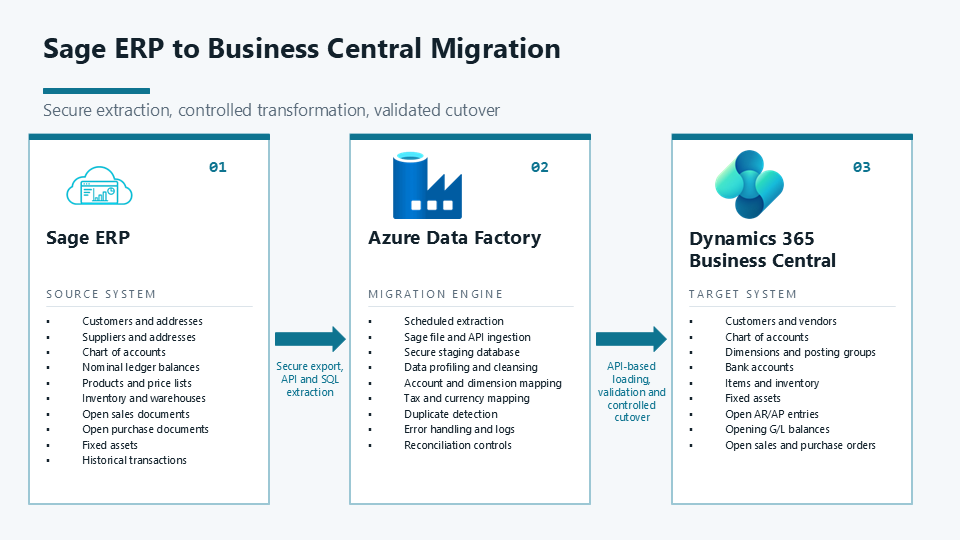
Why Sage to Business Central Migration Requires More Than an Import
Sage environments often contain years of operational and financial data. Even when data appears straightforward, real migration projects commonly involve challenges such as:
-
Inconsistent item codes, units of measure, or vendor records.
-
Account structures that need to be aligned with a new Business Central chart of accounts.
-
Bills of materials that require parent and component relationships to load in the right sequence.
-
Open balances, transaction history, and audit requirements.
-
Custom Sage fields and business rules that do not map directly to standard Business Central fields.
-
Multiple companies, locations, currencies, or historical systems.
A basic CSV import can be useful for small, clean datasets. It becomes risky when the migration must be repeatable, traceable, and capable of handling data dependencies at scale.
Azure Data Factory is designed for orchestrating data movement and transformation through automated pipelines, activities, and monitoring capabilities. It can support a controlled migration process rather than a one-time manual data load. [web:5]
The Navisiontech Sage to Business Central Migration Connector
Navisiontech’s migration connector is built around Azure Data Factory pipelines. It provides a framework for moving Sage data into Dynamics 365 Business Central while applying mappings, transformations, validation rules, and load sequencing that reflect the client’s operational requirements.
What the connector can migrate
The exact scope is tailored to the Sage edition, data quality, customizations, and Business Central design. Typical migration objects include the following.
| Data area | Example Sage records | Business Central outcome |
|---|---|---|
| Items and inventory | Item master, descriptions, item categories, units, costing data, stock information | Item records and related inventory setup aligned to Business Central |
| Vendors | Vendor master, addresses, contacts, payment terms, tax details | Vendor cards and purchasing-related master data |
| Chart of accounts | GL accounts, account categories, dimensions, posting relationships | A Business Central chart of accounts designed for reporting and posting |
| Bills of materials | Finished goods, assemblies, components, quantities, versions | Production BOMs, assembly structures, or related item relationships, based on the target design |
| Financial and operational history | General ledger history, open entries, balances, purchase and sales history, selected inventory history | Historical records, opening balances, or a scoped history strategy based on reporting and compliance needs |
| Supporting reference data | Payment terms, shipping methods, posting groups, dimensions, locations, currencies | Required setup and reference data that supports accurate transaction processing |
Because every organization uses Sage differently, the connector is not positioned as a one-size-fits-all import. It is an integration and migration framework that Navisiontech configures around the target Business Central design.
How the Azure Data Factory Pipeline Works
The migration process follows a deliberate data lifecycle: extract, profile, transform, validate, load, reconcile, and repeat until the cutover dataset is approved.
1. Extract Sage data
The first pipeline stage connects to the available Sage data source or approved extraction method. Depending on the source environment, that may involve databases, files, APIs, or staged exports.
Azure Data Factory supports pipeline orchestration and a broad connector ecosystem. Where a source is not available through a native connector, organizations can use supported approaches such as ODBC, REST, OData, HTTP, files, or custom activities, subject to the system’s capabilities and security requirements.
2. Profile and stage the data
Before loading data into Business Central, the migration team profiles the source records. This step identifies issues such as:
-
Blank or duplicate vendor codes.
-
Invalid or inactive item records.
-
Missing units of measure.
-
Accounts that do not fit the approved Business Central financial structure.
-
BOM components that do not exist as items.
-
Historical records with missing references or inconsistent dates.
A staging layer provides a controlled place to inspect, cleanse, and compare data before it reaches the production ERP.
3. Transform and map for Business Central
Source and target systems rarely use identical structures. The connector applies defined mapping rules to translate Sage fields and values into the Business Central design.
For example, a source account may need to map to a new account number, a posting group, a dimension, or a combination of these fields. An item may require normalization of its unit of measure, item category, vendor relationship, costing method, or replenishment settings before it can be loaded.
Business Central supports integration through REST APIs, which are commonly used for third-party data exchange.
4. Load data in the correct sequence
Migration sequencing is essential. Loading dependent data too early can create errors, incomplete relationships, or unreliable reporting.
A typical sequence might be:
-
Foundation and reference data.
-
Chart of accounts, dimensions, posting setup, currencies, and locations.
-
Vendors, customers, items, units of measure, and categories.
-
Bills of materials, assemblies, or production-related structures.
-
Opening balances, open documents, inventory quantities, and approved history.
-
Reconciliation reports and exception remediation.
The actual sequence depends on the Business Central configuration and the scope of the migration.
5. Validate and reconcile
A migration is not complete when a pipeline reports success. It is complete when the migrated data is reconciled to approved source totals and operational users can perform the critical processes they need.
Navisiontech can build validation into the migration approach, including record counts, control totals, required-field checks, exception logs, duplicate detection, and source-to-target reconciliation reporting.
6. Repeat for testing and cutover
A major advantage of a pipeline-driven migration is repeatability. Teams can run trial migrations, refine mappings, correct source data, test Business Central processes, and run the final cutover with a more proven method.
This matters because a successful ERP go-live depends on both technical load completion and business confidence in the converted data.
Handling Complex Migration Scenarios
Sage to Business Central projects often become complex because the data reflects real business history. Navisiontech can extend the migration design to address scenarios such as the following.
Multi-company and multi-location data
Organizations may have multiple legal entities, branches, warehouses, or operating units. The migration design can separate and map those records to the appropriate Business Central companies, locations, dimensions, and reporting structures.
Customized Sage fields and business rules
If Sage contains custom fields or workflows that are important to daily operations, Navisiontech can assess whether the data should map to standard Business Central fields, extensions, dimensions, related tables, or a separate reporting archive.
Complex BOM structures
BOM migration requires more than moving a header and its component lines. Components must exist, units and quantities must be valid, and the target design must distinguish whether the organization uses assembly, manufacturing, kits, substitutions, versions, or another process in Business Central.
History versus opening balances
Not every organization needs all historical transactions inside Business Central. A practical strategy may include:
-
Detailed transactional history for a defined reporting period.
-
Open receivables and payables for operational continuity.
-
Inventory on hand and valuation for a clean starting position.
-
General ledger opening balances with supporting history stored in an accessible archive.
Navisiontech helps determine the right balance between historical access, performance, compliance, reporting needs, project timeline, and migration risk.
Data quality remediation
A migration is an opportunity to improve master data. Instead of moving duplicates, obsolete records, inconsistent naming conventions, and incomplete classifications into a new ERP, the project can establish data governance rules before go-live.
Benefits of a Pipeline-Driven Migration
A structured Azure Data Factory approach can provide several practical advantages compared with a largely manual conversion process.
Azure Data Factory is intended to compose, automate, and monitor data movement and transformation services through pipelines, which aligns well with the repeatability required in ERP data migration.
How Navisiontech Helps With Sage to Business Central Migration
Navisiontech combines Business Central functional knowledge with Azure-based migration engineering. The goal is not only to transfer records, but to make the migrated data usable for finance, purchasing, inventory, manufacturing or assembly, reporting, and future growth.
Migration assessment and scope definition
Navisiontech begins by reviewing the Sage environment, required data domains, transaction history expectations, reporting needs, Business Central target design, integrations, and cutover constraints.
Data mapping and transformation design
We define how Sage values map to Business Central fields, configurations, posting structures, dimensions, master records, and custom requirements. This includes documenting exceptions so stakeholders can review and approve business decisions before the final load.
Azure Data Factory pipeline implementation
Navisiontech configures the migration connector and associated pipelines, staging, transformation logic, load sequences, and error handling appropriate to the approved scope.
Data cleansing and validation support
We help identify data gaps early, establish validation rules, manage exceptions, and provide reconciliation outputs that help finance and operational teams verify the results.
Test migrations and user validation
Before go-live, we run test cycles so users can verify critical data, reports, balances, items, vendors, BOMs, and processes in Business Central.
Cutover and post-go-live support
Navisiontech supports cutover planning, final migration execution, reconciliation, issue triage, and post-go-live stabilization so the organization can transition with confidence.
Example: Migrating Items, Vendors, BOMs, and History
Consider a Sage manufacturer or distributor moving to Business Central. The company has several thousand active items, supplier records with inconsistent naming, multi-level BOMs, and years of financial history.
A Navisiontech migration plan could:
-
Extract item, vendor, account, BOM, and transaction datasets from Sage into a controlled staging environment.
-
Standardize item codes, vendor identifiers, units of measure, and required Business Central attributes.
-
Load the chart of accounts and required setup first.
-
Load vendors and items before BOM headers and BOM components.
-
Validate that every BOM component exists and that quantities and units are valid.
-
Load the agreed open balances and historical records.
-
Compare source and target totals, record counts, and selected transaction samples.
-
Repeat the process in a test environment before final cutover.
This approach helps replace a high-risk, one-time import with a controlled and testable migration process.
Frequently Asked Questions
Can Azure Data Factory migrate Sage directly to Business Central?
Azure Data Factory can orchestrate the extraction, transformation, validation, and movement of data as part of a Sage to Business Central migration. The exact connection method depends on the specific Sage product, the source access available, the target Business Central API or extension design, and the client’s security requirements. Navisiontech configures the migration architecture around those conditions.
What Sage data can be migrated to Business Central?
Typical scope includes items, vendors, customers, the chart of accounts, dimensions, inventory data, bills of materials, open transactions, opening balances, and selected history. The final scope should be defined through a data assessment because not all legacy data belongs in the new ERP.
Can you migrate historical transactions from Sage to Business Central?
Yes, historical data can be included where it is appropriate and technically feasible. The right approach depends on volume, reporting needs, compliance needs, project timeline, and whether detailed history should reside in Business Central or an accessible archive.
How do you validate a Sage to Business Central migration?
Validation should include record counts, financial control totals, balance comparisons, required-field checks, duplicate and exception reporting, and user testing of core business processes. Navisiontech uses a reconciliation-focused approach so the migration is measured by business readiness, not only pipeline completion.
How long does a Sage to Business Central migration take?
The timeline depends on data volume, Sage version, number of companies, data quality, customizations, integrations, required historical data, testing cycles, and cutover requirements. A discovery assessment is the best way to establish a realistic timeline and scope.
Plan Your Sage to Business Central Migration
A Sage migration is a chance to establish a more connected, scalable ERP foundation. With an Azure Data Factory driven connector, Navisiontech can help your team move beyond manual exports and uncertain imports toward a migration process built for visibility, repeatability, validation, and future growth.
Whether you need to migrate core master data, complex BOMs, financial history, multiple entities, or custom business rules, Navisiontech can help design the right Sage to Dynamics 365 Business Central migration strategy.
Talk to Navisiontech about your Sage to Business Central migration requirements.





Leave A Comment