
Epicor to Business Central Migration
Moving from Epicor ERP to Microsoft Dynamics 365 Business Central is more than a data import. It is an opportunity to establish a cleaner, more dependable data foundation for finance, purchasing, inventory, manufacturing, sales, and operations.
Navisiontech has developed an Azure Data Factory-based migration approach for organizations moving from Epicor to Business Central. Through a controlled pipeline, we help extract, stage, transform, validate, reconcile, and load data in a sequence that supports a confident go-live. The approach can support parts, vendors, customers, chart of accounts, bills of materials, inventory, open documents, and selected historical data.
Why Epicor data migration needs structure
Epicor environments can contain years of financial activity, manufacturing records, inventory movement, supplier and customer relationships, warehouse setup, custom fields, and business-specific processes. Simply exporting these records and uploading them to another ERP can create incomplete data, broken record relationships, and financial reconciliation issues.
For example, a part may need more than a description and item number to function correctly in Business Central. It can require a unit of measure, item category, costing setup, location strategy, inventory posting group, and related supplier or component information. Similarly, a bill of materials must reference valid items and reflect the Business Central manufacturing or assembly process that the organization plans to use after go-live.
Azure Data Factory is designed to orchestrate data movement and transformation workflows. Pipelines can coordinate related tasks, enforce sequence, and provide repeatability for trial migrations and production cutover.
How the migration pipeline works
Navisiontech’s Epicor-to-Business-Central migration pipeline uses a defined flow that separates source extraction, data preparation, loading, and validation.
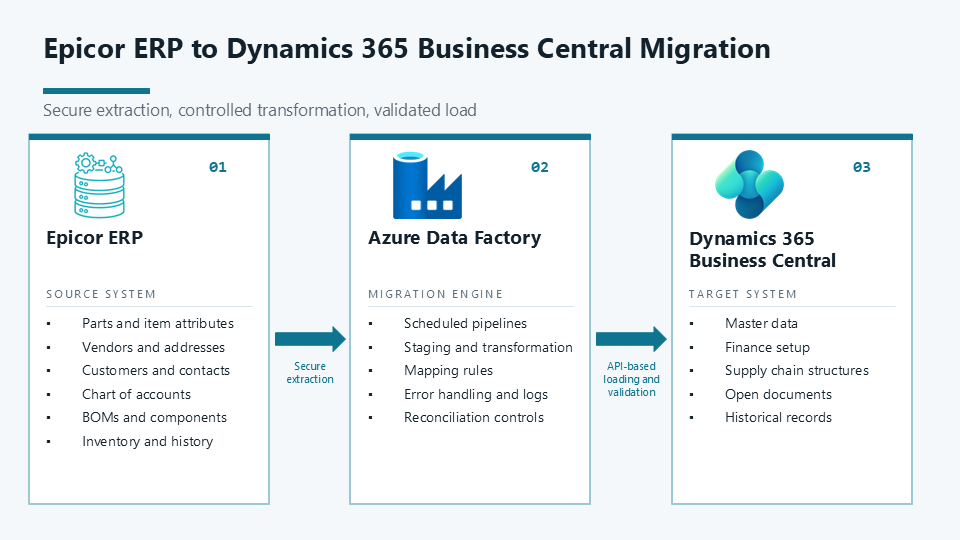
1. Extract Epicor data securely
The project begins with a migration discovery process. Navisiontech identifies the Epicor version, modules, data entities, customizations, record volumes, data owners, and approved extraction methods. This step ensures the migration scope reflects the organization’s future Business Central processes rather than simply copying every legacy record.
Epicor provides an open architecture that uses REST and OData tools for standardized access. The exact endpoints, security permissions, available business objects, custom entities, and query behavior should be verified in each Epicor environment before migration development begins.
Depending on the client environment and migration requirements, Navisiontech can use approved APIs, OData services, exports, or governed database extracts. The extraction process records source counts and timestamps so every trial migration and final cutover load can be tracked and reconciled.
2. Stage and profile the source data
After extraction, the data is placed in a controlled staging layer. Staging protects Business Central from raw legacy data and gives the migration team an organized location to review data quality, identify exceptions, and apply approved transformation rules.
During this stage, Navisiontech can identify:
-
Duplicate parts, suppliers, customers, contacts, and legacy identifiers
-
Missing required fields, such as units of measure, address details, payment terms, currencies, or categories
-
Inactive records that should be excluded, archived, or handled separately
-
Invalid warehouse codes, location codes, classifications, account references, or transaction relationships
-
Bills of materials that reference components outside the approved migration scope
-
Inventory or financial values that require review before they are moved to Business Central
Data cleansing is most effective before loading begins. Early profiling gives finance and operations stakeholders time to make decisions about ownership, cleanup, exclusions, and mapping rules before the cutover window.
3. Map and transform Epicor records
The migration pipeline transforms Epicor records to fit the Business Central data model and the organization’s future-state configuration. Navisiontech documents source-to-target mappings, conversion rules, record dependencies, and validation criteria so business and technical teams can approve the migration design.
Common transformation activities include:
-
Mapping Epicor parts, part classes, product groups, attributes, and units of measure to Business Central items, item categories, item attributes, and units of measure
-
Mapping suppliers, addresses, contacts, terms, currencies, and purchasing defaults to Business Central vendor and purchasing setup
-
Mapping customers, ship-to addresses, contacts, terms, and sales-related information to Business Central customer and sales setup
-
Translating Epicor general ledger accounts and segments into the Business Central chart of accounts, dimensions, and posting configuration
-
Preparing BOM components, quantities, revisions, and related structures for Business Central manufacturing or assembly processes
-
Standardizing warehouses, locations, bins where applicable, inventory quantities, and costing information for the approved Business Central operating model
-
Preserving legacy identifiers as reference fields when users, auditors, or reporting teams need traceability after go-live
A direct field-to-field transfer is rarely enough. The best migration design reflects how the company intends to operate in Business Central, including how it will classify products, analyze finance, fulfill orders, purchase materials, and manage manufacturing data.
4. Load data in the right sequence
Data must reach Business Central in dependency order. This prevents errors such as a bill of materials being loaded before its component items exist, inventory being assigned to an undefined location, or an open purchase order missing required vendor or item setup.
A typical load sequence includes:
-
Business Central foundation and reference configuration, including chart of accounts, dimensions, currencies, posting groups, payment terms, and other required setup.
-
Master data, including vendors, customers, items, units of measure, locations, contacts, and approved classifications.
-
Supply chain and manufacturing structures, including BOMs, components, revisions where in scope, and warehouse-related setup.
-
Opening balances, on-hand inventory, open sales orders, open purchase orders, open receivables, open payables, and approved work-in-process records where applicable.
-
Selected historical data and legacy references, based on reporting, audit, operational, and data-retention requirements.
-
Post-load validation, reconciliation, and business-user acceptance testing.
Business Central provides standard API v2.0 endpoints for integration with third-party applications and services. When a required migration entity is not available through a standard endpoint, Navisiontech can assess whether a custom API or approved import process is appropriate for the target solution.
5. Validate, reconcile, and repeat
A migration is not complete just because records appear in Business Central. The project team needs evidence that the data is complete, accurate, usable, and ready for daily operations.
Navisiontech can build validation and reconciliation controls into the migration workstream, including:
-
Counts of extracted, staged, transformed, rejected, and successfully loaded records
-
Required-field, lookup, format, and duplicate-record validation
-
Exception logs that identify the source record, failure reason, and correction owner
-
Parent-child integrity checks for BOMs, component relationships, and other related data
-
Financial reconciliation for opening balances, general ledger balances, receivables, and payables
-
Inventory quantity and value reconciliation according to the agreed opening-inventory method
-
Trial migrations that can be rerun after cleanup, mapping changes, or configuration updates
Repeatable pipelines provide an important advantage over ad hoc spreadsheet loads. The same approved rules can be executed through multiple test cycles, refined based on documented exceptions, and used again during production cutover.
Watch our migration videos
Video: Navisiontech ERP Migration Overview
Video: Navisiontech Business Central Migration Process
Epicor data Navisiontech can migrate
The right migration scope depends on your Epicor modules, future Business Central design, data quality, reporting needs, audit requirements, and cutover strategy. Navisiontech can help determine what should be operational in Business Central on day one, what should be retained for reference, and what should be cleaned or retired before migration.
Epicor manufacturing migration example
Consider an Epicor part called AX-450. It has a revision-controlled, multi-level bill of materials, components stocked in multiple warehouses, and open purchase orders for raw materials.
The migration begins by establishing the Business Central item setup for AX-450, including its unit of measure, item category, costing method, location strategy, and required posting groups. The migration pipeline loads and validates all component items before loading the parent BOM. It then transfers the approved component relationships, quantities, and applicable revision logic according to the Business Central manufacturing or assembly design.
Inventory is loaded using the agreed opening-balance approach. Open purchase orders are loaded only after suppliers, components, locations, payment terms, and purchasing setup are ready in Business Central. Finally, Navisiontech supports reconciliation of item counts, BOM relationships, inventory quantities, inventory values, and open-document totals before users approve the migration.
This dependency-first approach reduces common issues such as missing BOM components, inventory posted to an invalid location, or an open document lacking the configuration needed for Business Central processing.
How Navisiontech can help
Navisiontech combines Azure data engineering with Dynamics 365 Business Central functional expertise. We help organizations replace manual, one-time migration tasks with a structured process that is repeatable, testable, and aligned with business acceptance criteria.
Our Epicor-to-Business-Central migration services can include:
-
Epicor data discovery and migration readiness assessment
-
Azure Data Factory pipeline architecture, development, and testing
-
Extraction design using approved Epicor APIs, OData services, exports, or data access methods
-
Source-to-target mapping, data transformation, and cleansing rules
-
Business Central configuration alignment for finance, inventory, purchasing, sales, manufacturing, and warehousing
-
Migration of items, vendors, customers, chart of accounts, dimensions, BOMs, inventory, open documents, and approved history
-
Trial migration cycles, exception management, reconciliation, and user acceptance testing support
-
Cutover planning, go-live readiness, and post-go-live migration support
Whether you are moving to Business Central for Microsoft ecosystem alignment, stronger cloud ERP capabilities, more integrated reporting, or a modern platform for growth, Navisiontech can help make the data migration practical and controlled.
Frequently asked questions
Can Navisiontech migrate Epicor data to Business Central?
Yes. Navisiontech can assess your Epicor environment and define a migration approach for approved master data, financial structures, inventory, manufacturing data, open transactions, and selected historical records. The final scope depends on your Epicor configuration, data quality, target Business Central design, reporting needs, and cutover plan.
Can Epicor BOMs and revisions migrate to Business Central?
Yes. BOM migration can include parent items, component items, quantities, units of measure, and approved revisions or effective structures. The final mapping depends on whether the target Business Central environment will use manufacturing, assembly, or another operational design.
Can historical Epicor transactions be migrated?
Yes, when history is included in the migration scope. Many companies migrate opening balances and open transactions, while retaining Epicor as a historical reference system. Others migrate selected historical general ledger, sales, purchasing, inventory, or production records. Navisiontech helps define the approach that supports reporting, audit, operational needs, and long-term system performance.
Why use Azure Data Factory for Epicor-to-Business-Central migration?
Azure Data Factory supports orchestration of data movement and transformation workflows. It enables repeatable trial migrations, sequencing of dependent data, mapping rules, error logging, and reconciliation controls. This is especially valuable when the migration includes complex manufacturing relationships, multiple data domains, custom transformation requirements, or several test cycles before cutover. [web:31][web:33]
How is migrated data validated in Business Central?
Validation combines source and target record counts, exception-log review, master-data relationship checks, financial reconciliation, inventory reconciliation, and business-user acceptance testing. The acceptance criteria should be agreed during migration design, before the production cutover.
Start your Epicor migration assessment
Your Epicor data should support your move to Dynamics 365 Business Central, not slow it down. With structured Azure Data Factory pipelines, documented mappings, focused data cleansing, rigorous validation, and Business Central expertise, Navisiontech can help make even complex migrations manageable.
Talk to Navisiontech today about assessing your Epicor environment, defining the right migration scope, and building a dependable path to Dynamics 365 Business Central.





Leave A Comment